 Sitemoth
Sitemoth is a desktop SEO crawler that audits your whole website from your own computer.
Sitemoth follows every internal link the way a search engine does. It reports 240 kinds of technical issues, and each issue carries a severity, a priority and the fix.
Download SitemothSee all 240 checksVersion 1.0.3 for macOS, Windows and Linux. Free during the beta with no URL limit and no account.
What Sitemoth finds on a crawl
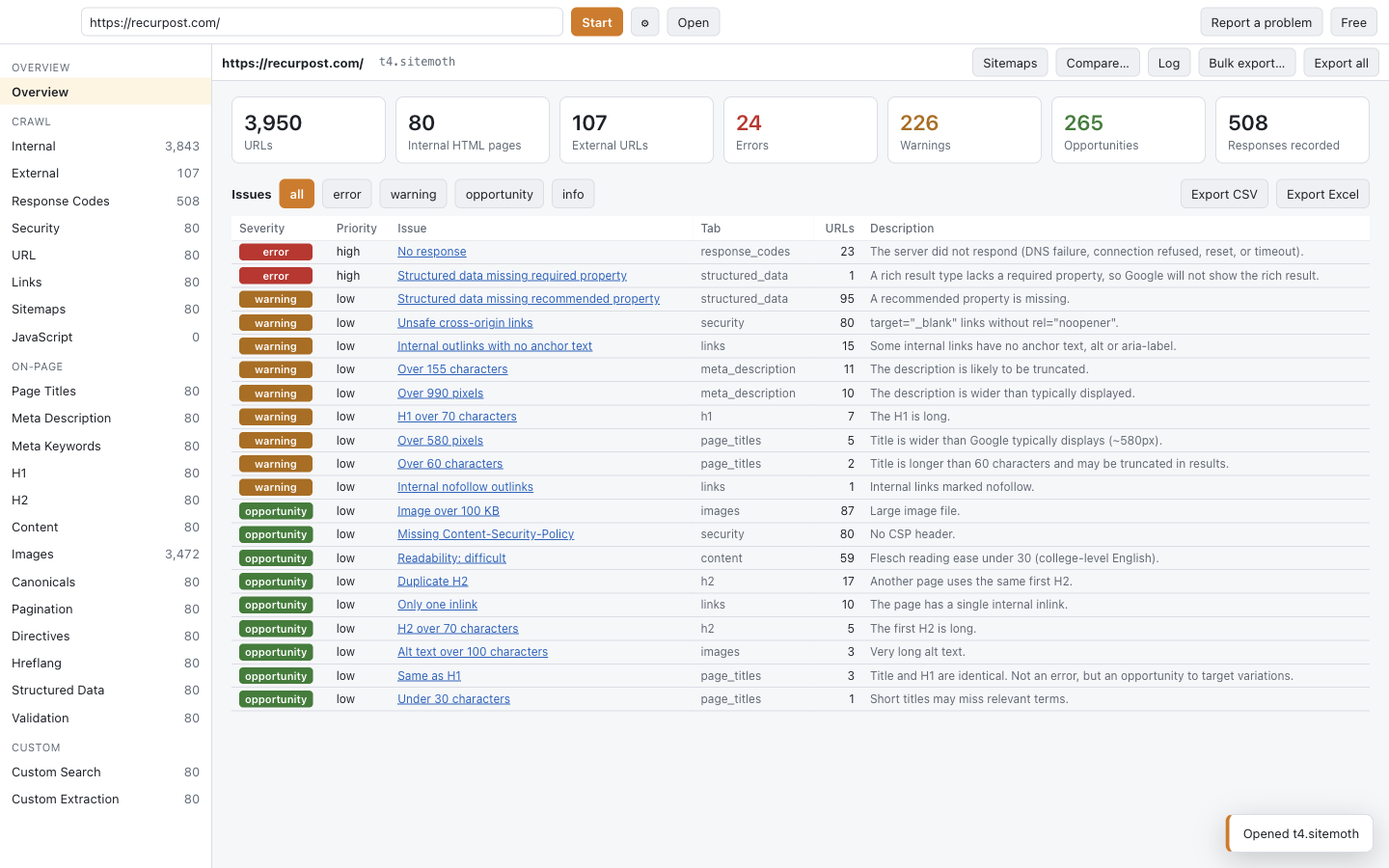
The screenshot below is a first Sitemoth crawl of an 80-page SaaS marketing site. Sitemoth found 3,950 URLs, most of them images and scripts, and flagged 24 errors, 226 warnings and 265 opportunities. These are the issue groups Sitemoth checks on every crawl:
- Sitemoth finds broken internal and external links, redirect chains, redirect loops and redirects that end on an error.
- Sitemoth flags missing, duplicate and over-length titles and meta descriptions, measured in characters and in pixels.
- Sitemoth catches canonicals that point at redirected, broken or noindex pages.
- Sitemoth checks hreflang for missing return links, invalid language codes and non-200 targets.
- Sitemoth detects exact and near-duplicate content and thin pages under 200 words.
- Sitemoth compares each sitemap with the crawl and lists orphan pages and indexable pages missing from the sitemap.
- Sitemoth reads your server logs and shows which pages Googlebot never requests and which URLs bots hit that your crawl never found.
- Sitemoth reports what JavaScript changed on a page, such as a title or a noindex added after load.
- Sitemoth validates structured data against the required and recommended properties of Google's rich result types.
How a Sitemoth crawl runs
Sitemoth runs every crawl in the same 6 steps:
- Sitemoth reads robots.txt and every XML sitemap it can find, including nested sitemap indexes.
- Sitemoth fetches pages 3 at a time with a 250 ms gap per host by default. You can pick Gentle, Normal, Fast or Maximum before you start.
- Sitemoth slows down on its own when a server answers 429, 503 or Cloudflare error 1015. It halves the parallel requests and doubles the delay, then speeds back up after 25 clean responses.
- Sitemoth renders pages in Chromium when you turn rendering on, and runs an axe-core accessibility audit on each rendered page.
- Sitemoth crawls URLs that exist only in sitemaps after the linked pages, so the URL limit goes to pages your visitors can reach.
- Sitemoth analyzes the finished crawl for duplicates, crawl depth, link score and sitemap gaps, and saves everything in one .sitemoth file.
A throttled page never counts as an SEO problem in Sitemoth. Sitemoth marks it as rate limited and retries it, so a Cloudflare block page does not show up as a missing title or a noindex.
Sitemoth compared with Screaming Frog
Sitemoth matches Screaming Frog's licensed feature set on crawling, rendering and the Google integrations. Sitemoth also reads server logs inside the same crawl file, which Screaming Frog sells as a separate product.
| Screaming Frog free | Screaming Frog license | Sitemoth beta | |
|---|---|---|---|
| URLs per crawl | 500 | Unlimited | Unlimited |
| Price | Free | £199 per user per year | Free during the beta |
| JavaScript rendering | No | Yes | Yes |
| Save and reopen crawls | No | Yes | Yes |
| Crawl comparison | No | Yes | Yes |
| Search Console and GA4 data | No | Yes | Yes |
| PageSpeed Insights | No | Yes | Yes |
| Accessibility audit | No | Yes | Yes (axe-core) |
| Spelling and grammar | No | Yes | Yes (LanguageTool) |
| Server log analysis | No | Separate product | Yes, built in |
| Command line and scheduling | No | Yes | Yes |
| MCP server for AI agents | No | No | Yes |
Screaming Frog figures come from its pricing and FAQ pages, checked October 2026. Its free version also cannot save crawls or render JavaScript.
Sitemoth 1.0.1 also covers the work around the audit: client folders, reports, tickets, monitoring and migrations.
| Sitemoth 1.0.1 adds | What it does |
|---|---|
| Clients | Sitemoth files each crawl in its client's folder by domain and shows the health score trend per client. |
| Client reports | Sitemoth writes a white-label HTML or PDF report with your logo, a health score and an executive summary. |
| Share links | Sitemoth uploads a report on request and gives you a read-only link that expires. |
| Fix tickets | Sitemoth sends problems to Jira, Linear, Asana, ClickUp, Trello or GitHub, one ticket per page template. |
| Monitoring | Sitemoth recrawls a site on a schedule on your computer and alerts Slack, Teams, Discord, a webhook or email. |
| AI search readiness | Sitemoth checks robots.txt for 19 AI crawlers, validates and generates llms.txt, and flags JavaScript-only content. |
| Search Console insights | Sitemoth finds cannibalized queries, pages losing clicks and pages ranking 8 to 20 with a technical problem. |
| Internal link suggestions | Sitemoth suggests source pages and anchors for orphan and weak pages, computed on your computer. |
| Screaming Frog import | Sitemoth opens Screaming Frog CSV exports as a crawl file. It does not read .seospider files. |
| Site migrations | Sitemoth maps old URLs to new ones, exports redirects in 7 formats and checks them after launch. |
Sitemoth for agencies
Sitemoth keeps every client's crawls, branding and alerts together, so an audit becomes a report, tickets and a monitor without leaving the app:
- Sitemoth files a new crawl in the client's folder because its domain matches the client.
- Sitemoth turns the crawl into a branded report with a health score, as HTML, as a PDF or as a read-only link.
- Sitemoth sends the fixes to the client's tracker, one ticket per problem and page template, with the affected URLs.
- Sitemoth recrawls the site on a schedule and tells you in Slack or by email when a page breaks or a noindex appears.
The agency features list each step, and monitoring explains the schedules and alerts.
Where Sitemoth fits and where it does not
Sitemoth fits
- Sitemoth fits SEO consultants and agencies who audit client sites, hand over branded reports and track each client's score month to month.
- Sitemoth fits teams planning a site migration who need a redirect map and a check after launch.
- Sitemoth fits in-house teams who need to crawl staging sites behind basic auth or a login cookie.
- Sitemoth fits anyone who outgrew the 500-URL free tier of Screaming Frog and wants rendering and saved crawls without a license during the beta.
- Sitemoth fits developers who want to script audits from the command line or from an AI agent.
Sitemoth does not fit
- Sitemoth does not fit teams who want one shared crawler in a browser for many users. A hosted crawler such as Lumar suits that better.
- Sitemoth does not fit sites with several million URLs today. Sitemoth has been tested on crawls in the tens of thousands of URLs.
- Sitemoth's direct-download Windows installer is not code-signed yet. Windows organizations that only allow signed software should install the Microsoft-signed Microsoft Store version instead.
Sitemoth works with AI agents
Sitemoth ships an MCP server, so Claude, Cursor and other AI agents can crawl a site, read its issues and inspect URLs with the same engine as the app. Claude Code adds it with one command:
claude mcp add --scope user sitemoth -- npx -y sitemoth mcpSetup for Claude Desktop, Cursor, VS Code and Windsurf is in the MCP guide.
Your crawl data stays on your computer
Sitemoth stores each crawl as a single file on your machine. The app contacts Sitemoth's servers only to check for updates, and to send a problem report or usage data when you agree to it. Your Google Search Console and Analytics data goes straight from Google to the app. A report reaches Sitemoth's servers only when you create a share link. See what Sitemoth sends and when.
Download Sitemoth
Sitemoth 1.0.3 is free during the beta, with every feature and no URL limit. Download Sitemoth for macOS, Windows or Linux, or read the full feature list first.
Questions about Sitemoth
Is Sitemoth free?
Sitemoth is free during the beta, with no URL limit and no account. A paid version with a free tier will follow. You will hear about it inside the app before anything changes.
Does Sitemoth render JavaScript?
Sitemoth renders JavaScript with a headless Chromium when you turn rendering on. The JavaScript tab then lists pages where scripts changed the title, canonical, noindex, content or links.
Can I crawl a staging site that needs a login?
You can crawl a staging site with basic auth, cookies or custom headers. Sitemoth sends them with every request, including rendered pages.
How many URLs can I crawl?
You can crawl as many URLs as your machine and the server allow during the beta. Sitemoth stores the crawl on disk, so memory is not the limit for crawls in the tens of thousands of URLs.
Can I give clients a report from Sitemoth?
You can save a white-label report with your logo and colors as HTML or PDF, or create a read-only link the client opens in a browser. See clients and reports.
Can I move from Screaming Frog to Sitemoth?
You can open Screaming Frog's Internal All and All Inlinks CSV exports as a Sitemoth crawl file. Sitemoth does not read .seospider files. See importing from Screaming Frog.
Can I use Sitemoth with Claude or Cursor?
You can connect Sitemoth to Claude Code, Claude Desktop or Cursor through its MCP server. The agent can start crawls, read issues and inspect URLs. See the MCP setup.